但是有不少用户反应,自己更新后Win11的预览体验计划空白了,这要怎么解决呢?下面小编就带着大家一起看看吧!
Windows11预览体验计划空白怎么解决?
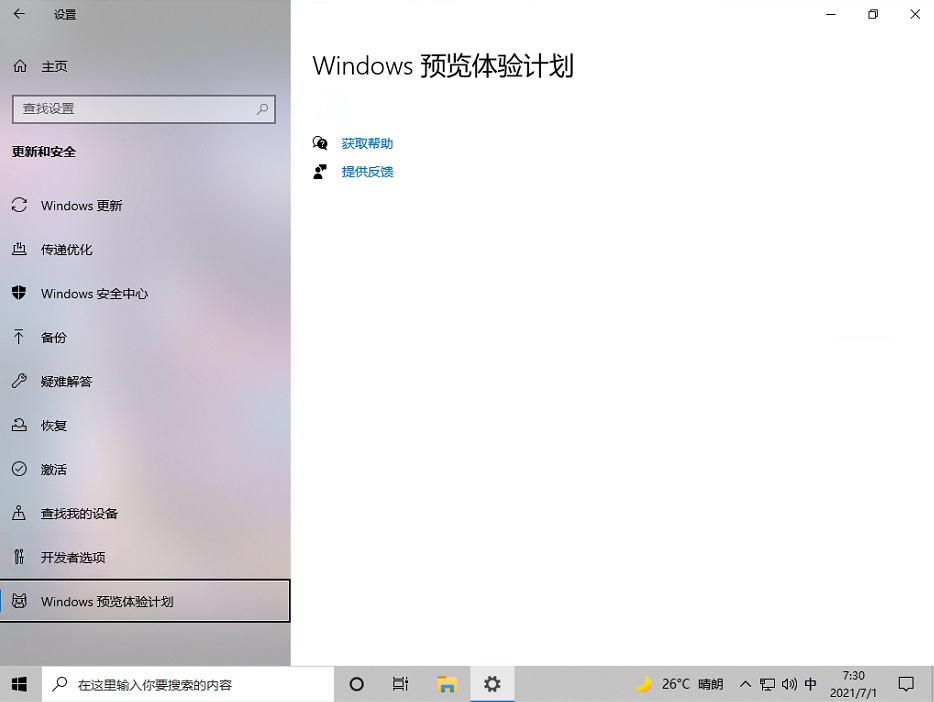
操作方法:
1、首先我们在搜索框找到Windows Powershell,右键以管理员身份运行。
Windows11预览体验计划空白怎么解决?
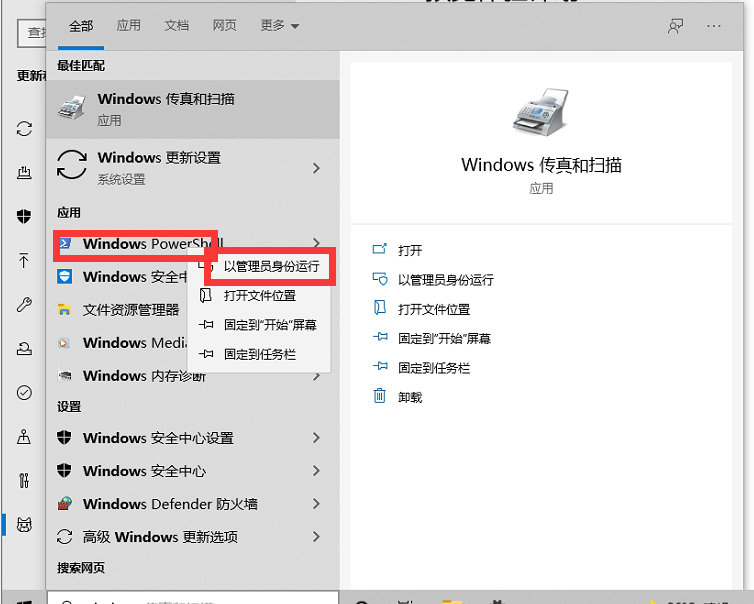
2、进入页面后我们输入以下代码:
01= "HKLM:SOFTWAREMicrosoftWindowsCurrentVersionPoliciesDataCollection"
02# Telemetry level: 1 - basic, 3 - full
03= "3"
04New-ItemProperty -Path -Name AllowTelemetry -Value -Type Dword -Force
05New-ItemProperty -Path -Name MaxTelemetryAllowed -Value -Type Dword -Force
复制代码
= "HKLM:SOFTWAREMicrosoftWindowsCurrentVersionPoliciesDataCollection" # Telemetry level: 1 - basic, 3 - full = "3" New-ItemProperty -Path -Name AllowTelemetry -Value -Type Dword -Force New-ItemProperty -Path -Name MaxTelemetryAllowed -Value -Type Dword -Force




 发表于 2023-2-10 06:51:36
 提升卡
提升卡 置顶卡
置顶卡 沉默卡
沉默卡 喧嚣卡
喧嚣卡 变色卡
变色卡 千斤顶
千斤顶 照妖镜
照妖镜
